UltraThink is Dead. Long Live Extended Thinking.
The magic keyword is deprecated — but there's a hidden way to get 2x more thinking tokens
Remember ultrathink? The magic keyword that unlocked Claude’s maximum reasoning power?
It’s deprecated.
But here’s what replaced it — and a hidden trick to get twice the thinking budget on 64K output models.
The Old Way: The ultrathink Keyword
For months, ultrathink was the magic word. Add it to your prompt, get 31,999 thinking tokens.
Hacker News threads debated its effectiveness. Power users swore by the “Opus + Ultrathink + Plan Mode” combo.
Under the hood, Claude Code detected the keyword and set the thinking budget:
// Simplified (other keywords like "megathink" and "think" existed too)
const thinkingBudget = prompt.includes("ultrathink") ? 31999 : 0;

// Passed to the Anthropic API
await client.messages.create({
  model: "claude-sonnet-4-...",
  messages: [...],
  thinking: thinkingBudget > 0 ? {
    type: "enabled",
    budget_tokens: thinkingBudget  // ← This is what matters
  } : undefined
});
What Changed
On January 16, 2026, Anthropic closed the book on ultrathink:
“Closing as ultrathink is now deprecated and thinking mode is enabled by default.” — Sarah Deaton, Anthropic
If you type “ultrathink” now, you’ll see this message:
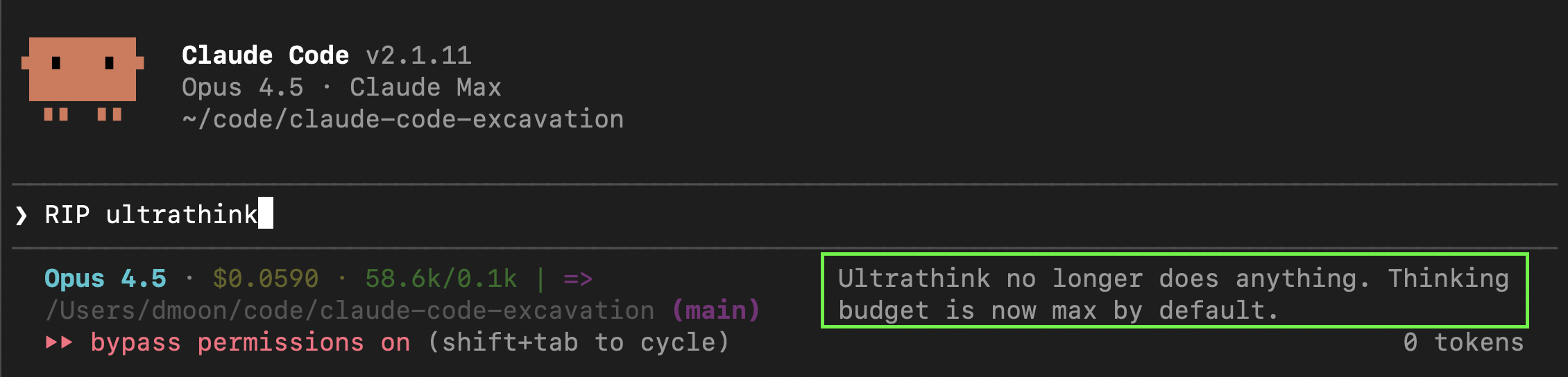
The New Default
Extended thinking is now automatically enabled for supported models:
- Opus 4.5 ✓
- Sonnet 4.5 ✓
- Sonnet 4 ✓
- Haiku 4.5 ✓
- Opus 4 ✓
- Claude 3.x ✗ (not supported)
The default budget? 31,999 tokens — the same as the old ultrathink maximum.
Here’s what happens now on every API call:
// 1. Determine thinking budget
let budgetTokens = 31999;  // Default: max

if (process.env.MAX_THINKING_TOKENS) {
  budgetTokens = parseInt(process.env.MAX_THINKING_TOKENS);
}

// 2. Auto-enabled for supported models
const thinkingEnabled = isSupportedModel(model);  // Opus 4.5, Sonnet 4/4.5, Haiku 4.5, Opus 4

// 3. Passed to Anthropic API on every request
await client.messages.create({
  model: "claude-sonnet-4-...",
  messages: [...],
  thinking: thinkingEnabled ? {
    type: "enabled",
    budget_tokens: budgetTokens  // ← 31,999 by default
  } : undefined
});
Translation: You no longer need magic keywords. Every prompt gets maximum thinking by default.
The Hidden Unlock: 63,999 Tokens
Here’s what most people don’t know.
The 31,999 default exists for backward compatibility with Opus 4 (which has a 32K output limit). But 64K output models support much more:
| Model | Max Output | Max Thinking Budget |
|---|---|---|
| Opus 4.5 | 64,000 | 63,999 |
| Sonnet 4.5 | 64,000 | 63,999 |
| Sonnet 4 | 64,000 | 63,999 |
| Haiku 4.5 | 64,000 | 63,999 |
| Opus 4 | 32,000 | 31,999 |
The thinking budget is capped at max_tokens - 1 because budget_tokens must be strictly less than max_tokens (which includes thinking), leaving at least 1 token for output:
// With MAX_THINKING_TOKENS=63999 on 64K output models
await client.messages.create({
  model: "claude-opus-4-5-...",
  max_tokens: 64000,
  thinking: {
    type: "enabled",
    budget_tokens: 63999  // ← 2x the default!
  }
});
To unlock the full 63,999 tokens on 64K output models (Opus 4.5, Sonnet 4/4.5, Haiku 4.5):
# Sets thinking budget for this session
MAX_THINKING_TOKENS=63999 claude --dangerously-skip-permissions
Or make it permanent (add to ~/.zshrc or ~/.bashrc):
export MAX_THINKING_TOKENS=63999That’s 2x the default thinking budget — entirely undocumented.
When to Use Max Thinking
More thinking isn’t always better. It costs tokens and takes time.
Default (31,999) is good for:
- Most coding tasks
- Debugging
- Refactoring
- Standard architectural decisions
Max (63,999) is worth it for:
- Complex system design
- Multi-file refactors with intricate dependencies
- Performance optimization requiring deep analysis
- Problems where the cost of error > cost of extra tokens
Disabling Extended Thinking
If you want the old behavior (no automatic thinking), you have two options:
Option 1: Environment variable
# Disables thinking for this session
MAX_THINKING_TOKENS=0 claude --dangerously-skip-permissions
Option 2: Settings
In your settings, set:
{
  "alwaysThinkingEnabled": false
}
TL;DR
ultrathinkis deprecated — the keyword does nothing now- Extended thinking is on by default — 31,999 tokens for all supported models
- Hidden unlock:
MAX_THINKING_TOKENS=63999gives you 2x more on 64K output models - To disable: Set
MAX_THINKING_TOKENS=0oralwaysThinkingEnabled: false
The magic words are gone. The magic is now automatic.
Appendix: Why Thinking Tokens Work
The practical guide ends here. What follows is the computational theory behind why more thinking tokens = better results.
The Core Idea: Test-Time Compute
Traditional AI scaling focused on training: bigger models, more data, longer training runs. But there’s another dimension — inference-time compute (also called “test-time compute”).
The insight: instead of just making models bigger, let them think longer on hard problems.
This was formalized in the seminal paper “Chain-of-Thought Prompting Elicits Reasoning in Large Language Models” (Wei et al., 2022). The authors showed that prompting models to generate intermediate reasoning steps dramatically improved performance on math, logic, and commonsense tasks.
Why It Actually Works: The Theory
There’s a deep computational reason why intermediate tokens help. It’s not just “more time to think” — it’s about breaking through fundamental architectural limits.
The Depth Problem
Transformers process all tokens in parallel through a fixed number of layers. Without intermediate steps, a transformer’s computational power is bounded by its depth. Research has shown that constant-depth transformers can only solve problems in TC⁰ — a limited complexity class that excludes many reasoning tasks.
This means standard transformers cannot solve:
- Graph connectivity (are two nodes connected?)
- Finite-state machine simulation
- Arithmetic formula evaluation (e.g., computing nested expressions like
((3+2)×4)-1)
These aren’t just hard — they’re provably impossible without intermediate computation.
How CoT Breaks the Limit
Each intermediate token acts as a computational step. “Chain of Thought Empowers Transformers to Solve Inherently Serial Problems” (ICLR, 2024) proved:
“With T steps of CoT, constant-depth transformers can solve any problem solvable by boolean circuits of size T.”
In plain terms:
- Without CoT: Limited to shallow parallel computation
- With linear CoT steps: Can recognize all regular languages
- With polynomial CoT steps: Can solve all polynomial-time problems (P)
The thinking tokens aren’t just “working memory” — they’re literally expanding what’s computationally possible.
The Scratchpad Insight
“Show Your Work: Scratchpads for Intermediate Computation” (Google, 2021) demonstrated this empirically:
“Transformers can be trained to perform multi-step computations by asking them to emit intermediate computation steps into a ‘scratchpad’. On tasks ranging from long addition to program execution, scratchpads dramatically improve the ability of language models to perform multi-step computations.”
The key realization: LLMs are stateless between generation cycles. The only way to carry state forward is through the tokens themselves. Thinking tokens are the model’s only persistent memory during reasoning.
The Scaling Law
“Scaling LLM Test-Time Compute Optimally” (DeepMind, 2024) showed that test-time compute can outperform model scaling:
“In a FLOPs-matched evaluation, test-time compute can be used to outperform a 14x larger model.”
The relationship is logarithmic — doubling thinking tokens doesn’t double accuracy, but it consistently improves it. Anthropic’s own research showed Claude’s math accuracy improves predictably with thinking budget (“Visible Extended Thinking”, 2025).
Industry Adoption
This isn’t just academic. Thinking tokens have gone from experimental to default behavior across all major labs:
| Provider | Product | Approach |
|---|---|---|
| OpenAI | GPT-5, o3, o4-mini | Thinking built into GPT-5; o-series succeeded by GPT-5 family |
| Anthropic | Extended Thinking | Visible thinking via budget_tokens parameter |
| Gemini 3 Pro/Flash | thinking_level parameter (low/high); Deep Think mode |
OpenAI’s o1 started the trend in late 2024 with hidden reasoning tokens (“Learning to Reason with LLMs”). Now in 2026, reasoning is baked into the flagship models — GPT-5, Claude Sonnet/Opus 4, Gemini 3 — no longer a separate “reasoning model” you have to opt into.
The Trade-off
More thinking = better results, but also:
- Higher latency (you’re waiting for more tokens)
- Higher cost (thinking tokens are billed)
- Diminishing returns (easy problems don’t benefit)
That’s why Claude Code’s default of 31,999 tokens is a sweet spot — enough for complex reasoning, not so much that simple tasks become slow and expensive.
Key Papers & Sources
| Year | Paper | Key Contribution |
|---|---|---|
| 2021 | Scratchpads for Intermediate Computation | Empirical proof that intermediate tokens enable multi-step computation |
| 2022 | Chain-of-Thought Prompting | Original CoT paper (Wei et al.) |
| 2023 | The Expressive Power of Transformers with CoT | Formal complexity theory analysis |
| 2024 | CoT Empowers Transformers for Serial Problems | ICLR paper proving CoT breaks TC⁰ limits |
| 2024 | Scaling LLM Test-Time Compute | Optimal compute allocation strategies |
| 2024 | Learning to Reason with LLMs | OpenAI o1 announcement |
| 2025 | Visible Extended Thinking | Anthropic’s design philosophy for visible reasoning |
All findings verified against Claude Code v2.1.11 (January 2026). Want to verify yourself? npm pack @anthropic-ai/claude-code, extract, deobfuscate with webcrack, and search the source.